Installs a virtual PC so that you can test out different operating systems, Window setting and configurations without losing anything from your actual computer.
Microsoft Virtual PC 6.0 (2007) is light simple software that allows you to execute a completely virtual computer inside your computer!
Microsoft Virtual PC 6.0 has many different uses and configurations to choose from. The Operating systems that it supports in the Guest computer are: Windows 98, Windows NT Workstation, Windows 2000, Windows XP, Windows Vista, OS/2, Windows NT Server, Windows 2000 Server, Windows 2003 Server.
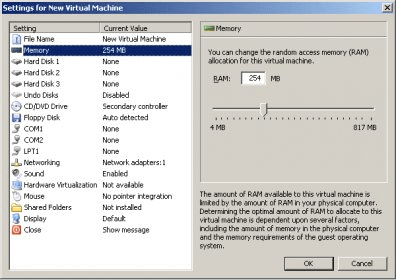
Microsoft Virtual PC creates, depending on the Guest Operating system, a predefined set of options that can be edited, like Virtual Hard Disk Size and RAM Memory.
Microsoft Virtual PC is a great tool for developers or system administrators to try applications or test migrations before actually performing them. The application would also come in handy for anyone who would like to test any other operating system or a clean install.
A Virtual PC can have 3 Virtual Hard Disks configured, a CD/DVD Drive or Floppy (using Host Drive or an ISO Image), manual configuration of communication ports (COM1, COM2 and LPT1), 4 network adapters (used to share connection files with Host), can emulate sound and do much more!
Without the need of formatting, or getting an additional computer, with this application you can test drive an operating system, software, or a configuration and see if it fits your needs!





Comments (11)